A2.1.3
Describe the function of network devices
Gateways Gateways are network devices that act as a bridge between two networks that use disparate protocol. A device that connects two different networks…
- Gateways
- Gateways are network devices that act as a bridge between two networks that use disparate protocol.
- A device that connects two different networks and allows data to pass between them.
- A gateway can enable communication between an office network and the internet, converting private network addresses to a public address using protocols such as NAT (network address translation).
- Additionally, gateways might incorporate security functions, filtering, and traffic management to enhance data flow and security across the networks they bridge.
- A gateway can also be used to convert data between different network protocols.
- For example, a gateway might translate email traffic from the simple mail transfer protocol (SMTP) on an enterprise network to another messaging protocol used by an external network, facilitating seamless communication between different email systems.
- Gateway can convert between different protocols.
- Within the context of voice over internet protocol (VoIP) communications, a gateway can translate between the digital signals used within an IP network and the analogue signals of traditional phone lines.
- This enables calls to be made between internet-based VoIP users and traditional telephone users.
- Hardware firewalls
- Firewalls are network security devices that monitor and control incoming and outgoing network traffic (packets) based on predetermined security rules.
- A firewall typically establishes a barrier between a trusted internal network and untrusted external networks, such as the internet, to block malicious traffic and prevent unauthorized access.
- Key features and functions
- monitoring packets and data
- prevent malicious data, packets and traffic
- allow safe and legitimate packets, data, and traffic
- Usage Scenarios
- Prevent attack/Direct interception 直接拦截
- from skeptical IP address
- contains malicious data packets
- Quality of Service (QoS)
- Zoom/VoIP(voice over internet protocol) or other important services higher priority
- game lower priority
- reduce latency and optimize experience
- Family Scenario
- routers contain firewall
- prevent the potential threat form hacker
- parent control(restrict websites)
- Prevent attack/Direct interception 直接拦截
- Software and hardware firewalls
| Category | Software Firewall | Hardware Firewall |
|---|---|---|
| Location | On a single device | At the network gateway |
| Scope | One computer | Entire network |
| Flexibility | High (customizable) | Lower |
| Protection Area | Internal threats | External attacks |
| Example | Windows Defender | Router / Enterprise firewall |
- Modems
- Modems stands for the modulator-demodulator.
- Modulator is used for transferring the digital signals(0,1) from a computer to analogue signals.
- Demodulator is used for transferring the analogue signals to digital signals.

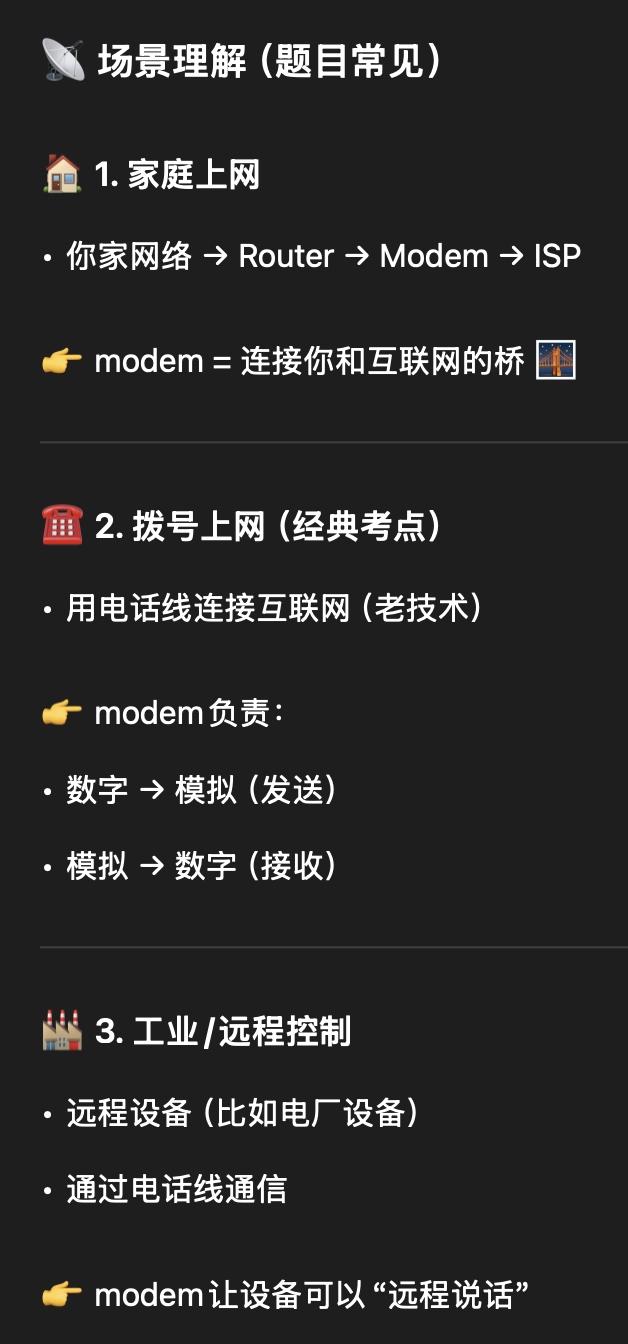
- A modem converts digital signals into analogue signals for transmission over communication lines and converts them back into digital signals at the receiving end.
- Network interface cards (NICs)
- Network interface cards (NICs) are hardware components within a computer or network device which facilitate the interface between the physical network and the device’s processing capabilities.
- NICs perform the critical function of converting electrical signals received from the network into digital data that the computer’s processor can understand and vice versa. This conversion is essential for the communication process over computer networks.
- characteristics
- connect
- enables the device to connect to network
- convert
- convert electrical/light/radio signal to digital data, or vice versa
- transmit/receive
- send or receive data (bidirectional)
- identify MAC address
- MAC address uniquely identifies each device
- ensure that packages are being sent to the correct/intended device
- protect
- buffer: prevent package loss
- CRC: error checking
- connect
- Router
- Routers are network devices that manage the exchange of data between different networks. They direct data packets by determining the optimal path for transmission using routing tables and routing protocols.
- At its core, a router examines the destination IP address in each packet and uses a routing table to determine the best next hop. Routers update their routing tables using static or dynamic routing protocols, allowing them to learn network paths and make efficient routing decisions.
- Routers are responsible for receiving, processing, and forwarding data packets to their correct destinations. A packet may pass through multiple routers before reaching its destination. Routers inspect packet headers and use protocols such as RIP (Routing Information Protocol) to find the fastest path.
- Key Functions
- Determine the best path for data transmission
- Forward packets between networks
- Use IP addresses to identify destinations
- Maintain routing tables
- Use routing protocols (e.g., RIP) to update paths
- Switches
- Switches are networking devices that connect devices within a LAN. Switches manage the flow of data within a network by receiving, processing and forwarding data packets (also called frames) to the correct destination device.
- At their core, switches receive incoming data packets from one device and use the MAC address information contained within the packet to forward it to the appropriate destination device.
- Switches maintain a MAC address table, also known as a forwarding table, which maps each MAC address to the corresponding switch port. This allows the switch to effectively direct traffic by looking up the destination MAC address of each frame and forwarding the frame directly to the port associated with that address.
- While switches are efficient at directing traffic, they must handle broadcasts (sent to all devices) and multicasts (sent to a group of devices) differently. For these types of traffic, the switch forwards the frames to multiple ports based on the needs of the network protocol being used.
| Scenario | Description |
|---|---|
| Small / Home Office | Connects devices (computers, printers, storage) and enables resource sharing |
| Enterprise Networks | Supports VLAN segmentation, link aggregation, improves security & performance |
| Data Centres | Manages server traffic, high throughput, low latency, handles large data |
| Schools / Universities | Connects campus networks, supports thousands of devices |
- Wireless access points (WAPs)
- Wireless access points (WAPs) serve as the interface between the wired infrastructure and wireless devices. WAPs convert wired Ethernet data into wireless signals and vice versa, effectively extending the reach of the network to areas where wiring is impractical, impossible or undesirable.
- WAPs broadcast wireless signals that wireless devices can detect and connect to. They operate by receiving data packets from the wired network, converting these packets into radio frequencies, and transmitting them wirelessly. The process is reversed for incoming signals from wireless devices, which are converted back into data packets and relayed onto the wired network.
- In larger installations, multiple WAPs can be configured to create a wireless network mesh. This setup allows users to move between different areas (for example, between floors or rooms in a building) without losing connection, as their devices automatically switch to the strongest available signal from the nearest WAP.
- WAPs can be managed centrally, often via controllers that configure settings, manage network policies and provide tools for monitoring network usage and performance. This central management helps maintain consistent configurations across multiple WAPs and simplifies the task of updating network settings or firmware.
| Scenario | Function | Benefits |
|---|---|---|
| Office | Wireless access across building | Mobility, collaboration |
| Schools / Universities | Campus-wide wireless coverage | Access from classrooms, libraries, outdoors |
| Public / Retail | Provide free Wi-Fi | Customer satisfaction, location-based services |
| Residential | Home wireless connectivity | Supports multiple smart devices |
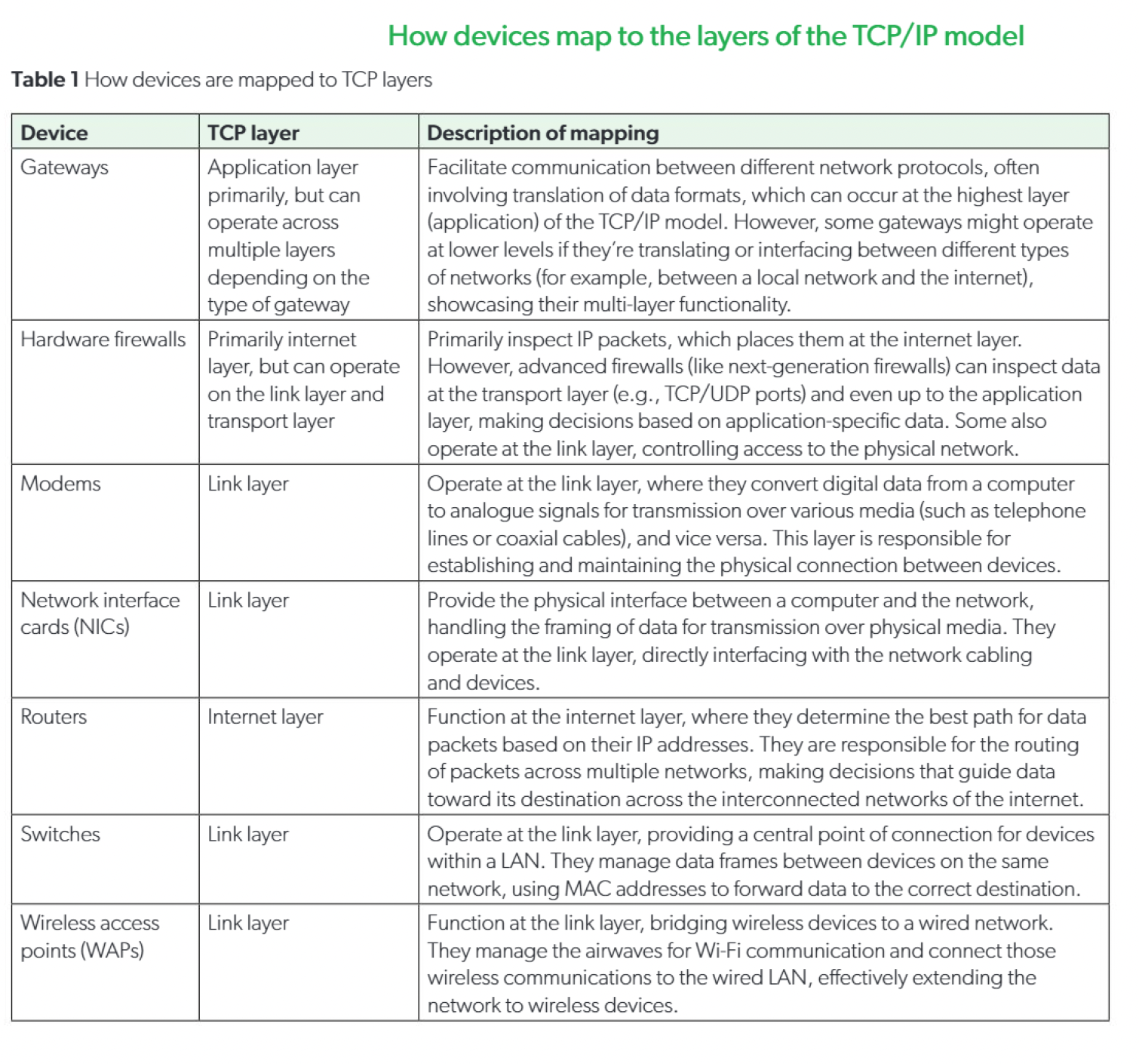
- How devices map to the layers of the TCP/AP model